Our end of February update includes the major update to our authentication system, new options for our popular Featured Topic block, a new way to highlight author Bluesky profiles, as well as some bug fixes. Check out the full update below and reach out to us via Freshdesk if you have any questions or feedback. You can also check out past Lede platform updates.
Authentication System Update
We launched a major update to Lede’s authentication system on Monday. The new system is built around AuthJS, a popular authentication management framework that will improve session stability between your customers’ visits to your site. This upgrade also enables all publishers to offer Google Single Sign-On as an authentication option.
The system also streamlines the process of verifying customers’ email addresses and bringing them through the subscription purchase workflow.
The new system gives our engineering team greater flexibility to refine various authentication flows. Since Monday’s initial deployment, we’ve already improved the sign-in email, with enhanced branding on the verification page coming soon. We would love to hear your feedback on the new login system and your suggestions for features and improvements. Please reach out via FreshDesk with any ideas or requests!
Haven’t implemented Google SSO yet? We’re happy to help! Contact us through FreshDesk to schedule a quick 15-minute Zoom session where we’ll guide you through the process and ensure correct implementation.
Quick Tip: Most login issues can be resolved with a simple hard refresh before logging back in — a helpful troubleshooting step to share with your users. We made several adjustments to our caching systems after the launch and this step can ensure your customers’ browser is using the most up to date version.
Featured Topic Block Enhancements
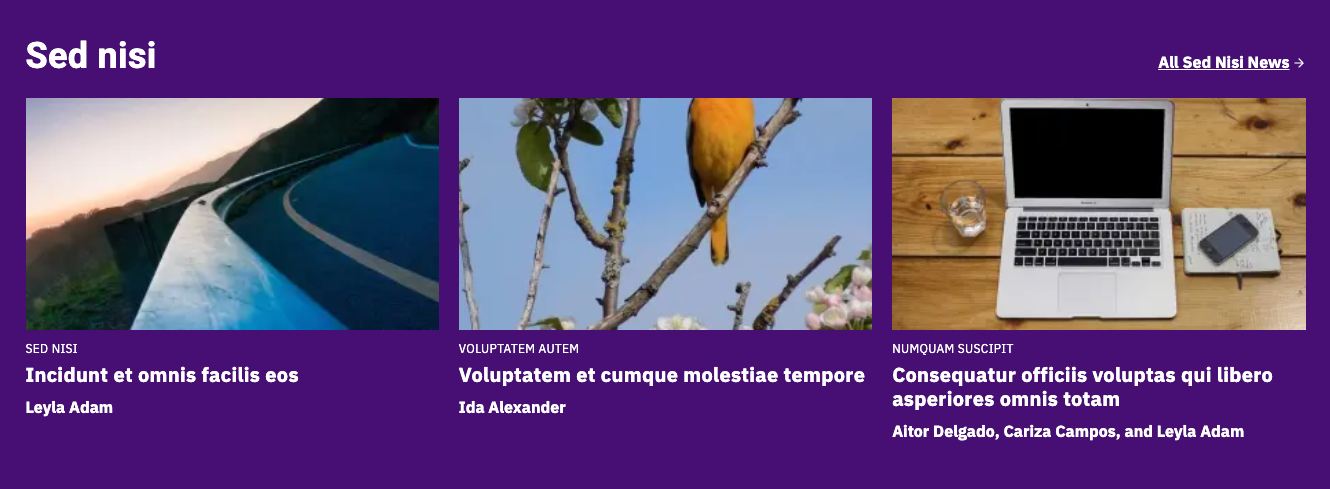
We’ve upgraded our popular Featured Topic Block with several exciting new options to make your content more engaging. The block—which showcases up to four of your most recent posts from a selected category or tag—now includes:
A new Grid layout option
An optional call-to-action button
Customizable background colors
How to Use These New Features
Grid Layout: Simply navigate to the block’s sidebar and select “Grid” from the Featured Topics Layout menu.
Adding a CTA Button: In the block’s sidebar, click the “Display CTA” toggle. The button will link directly to the category page, and you can customize the text right in the editor.
Background Color: Access this option through the Styles tab (gear icon) in the block’s sidebar. For a more dramatic effect, select the full-width alignment option to extend the background color from edge to edge.
Feel free to experiment with these new features—all changes can be previewed before publishing to ensure you achieve exactly the look you want.
Featured Topic block using the new enhancements
Bluesky profile on single article pages
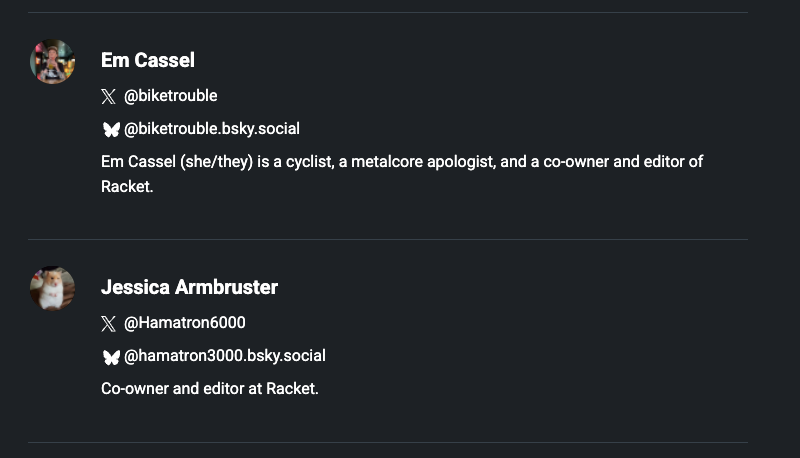
We’ve added a new way to highlight your authors’ Bluesky presence as the platform continues to grow in popularity. When an author includes their Bluesky handle in their profile, it will now automatically appear in the byline at the end of articles, accompanied by the platform’s iconic blue butterfly logo.
Example of Bluesky profiles on article page, courtesy of RacketMN
Bug fixes and improvements
- Addressed an issue where the wrong promotional price displayed when it was less than one dollar
- Addressed an issue where the time zones on post cards didn’t align with the time zone on single article pages
- Addressed an issue where the wrong bylines displayed on Apple News articles