We’re excited to announce that WordPress 6.6 was deployed to the Lede platform on Monday, October 21.
Key Changes
1. Redesigned Post Inspector
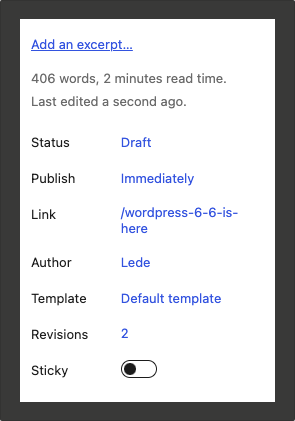
New Layout: The Featured Image data now appears at the top, followed by an enhanced main post panel (formerly the Summary panel).
Quick Insights: Editors can now see word count, estimated reading time, and last update timestamp at a glance.
Renamed Fields:
“Visibility” is now “Status”
“URL” is now “Link”
“Visibility” is now “Status”
“URL” is now “Link”
Relocated Elements: The Excerpt and Revisions panels have been integrated into the main panel.
2. Command Palette and Navigation Tools
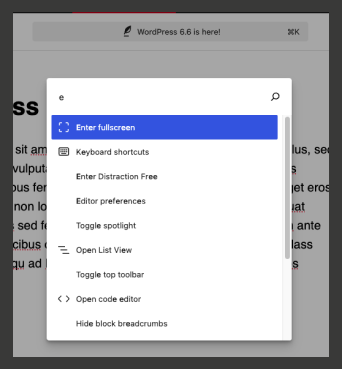
Access the Command Palette by hovering over it or using:
Mac: CommandCmd + K
Windows: Ctrl + K
Notable commands include:
Add a block before/after the current block
Delete or duplicate a block
Open/close the code editor
Editor Preferences
Enter distraction-free mode
Toggle settings sidebar
Additional improvements:
New keyboard shortcuts (e.g., tabbing to indent lists)
A new Tool icon in the left tools tray for toggling between block selection and editing
3. Negative Margins
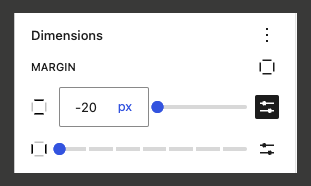
You can now set negative margins for any block with margin controls, allowing for more precise layout adjustments. Please note that negative margins must be entered manually, not via the slider.
Exploring the Update
We encourage you to explore the block editor after the update. You may discover new efficiencies in your workflow or exciting blocks to incorporate into your content.
If you encounter any issues following the update, please don’t hesitate to file a ticket with Fresh Desk.