The update to WordPress 6.7 was deployed to the Lede platform on Monday, April 28, 2025. That update brought several improvements to enhance your content creation experience as well as many performance and accessibility updates.
Key Changes
Performance improvements
This release includes significant performance enhancements to the editor experience, particularly for sites with extensive content. There is faster block rendering and reduced lag time with media-heavy posts.
Block Style Enhancements
WordPress 6.7 introduced new styling flexibility, adding options for borders, colors, and spacing across a number of blocks. These changes allow you to further customize your site without making a feature request.
Ordered List block options
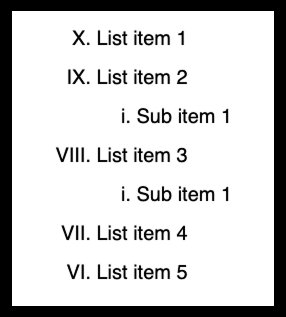
The List Block now includes options to customize ordered lists. There are now five options for markers: Numbers (default), Uppercase letters, Lowercase letters, Uppercase Roman numerals, and Lowercase Roman numerals. Lists can also be reversed – instead of counting up to 10, a list can count down. Additionally, lists can begin with any number. This is helpful when list items are spread over multiple list blocks.
Controls for the ordered list block in WordPress 6.7
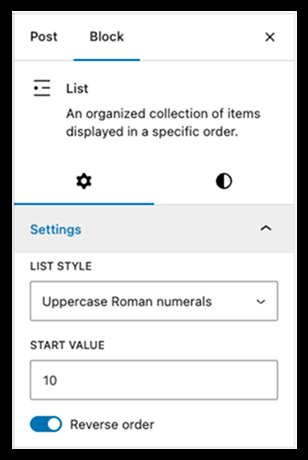
Ordered list block example showing use of Uppercase Roman numeral markers, in reverse order, with a starting value of 10
Paragraph block options
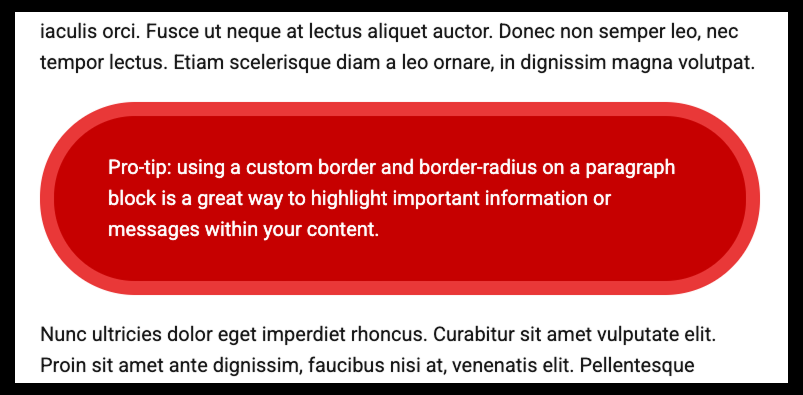
The paragraph block now includes options for padding, border, and border radius. Along with the background color, these options can be used on the homepage or in articles to call out important information, tips, or other kinds of featured content.
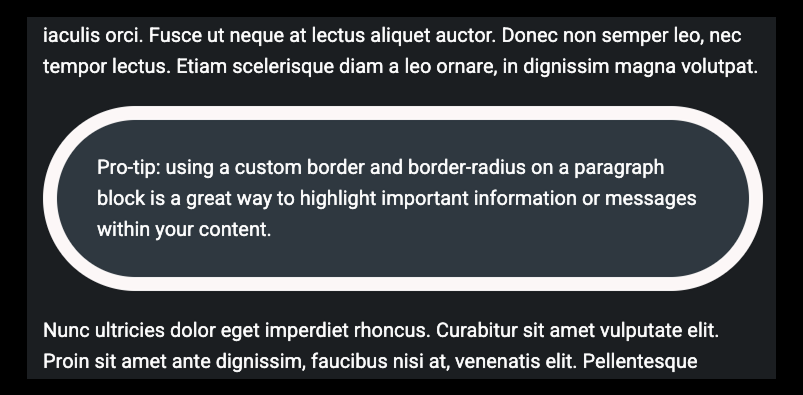
Example of a paragraph block with custom padding, border, and border radius as well as custom background color and text color.
The customized block in dark mode
Other block enhancements
Additional styling options have been added to many other blocks including the Image block (margins), Table block (background color and text color), and Pullquote blocks (wide width alignment and text centering).
Accessibility Enhancements
WordPress continues its commitment to accessibility with improved keyboard navigation throughout the block editor. Focus indicators are now more visible, and screen reader announcements have been refined for clarity. These improvements ensure all users can effectively manage their content regardless of how they interact with the platform.
Exploring the Update
We encourage you to explore the block editor after each WordPress update. You may discover new efficiencies in your workflow or exciting blocks to incorporate into your content.
If you encounter any issues following the update, please don’t hesitate to file a ticket with Fresh Desk.
We’re committed to providing you with the best tools for content creation and look forward to your feedback on these enhancements.